Lets take as an example of those mentioned child channels as below for RHEL9 patch catalog:
ansible-automation-platform-2.5-for-rhel-9-x86_64-rpms
codeready-builder-for-rhel-9-x86_64-rpms
OVERALL STEPS:
Step 1: * Firstly create a blank file using any text editor (such as notepad++) and save it as *.xml file such as 'RHEL-Updated-Channel-Filter-List.xml'
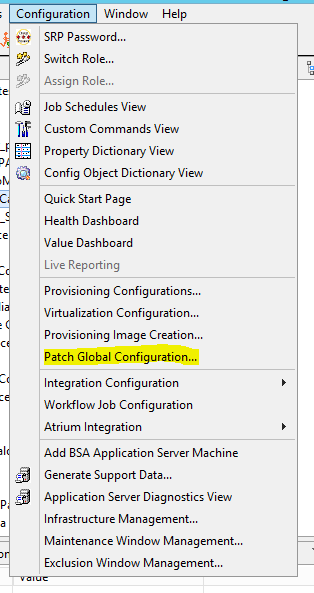
Step 2: From RCP console, open 'Patch Global Configuration' from 'Configuration' menu
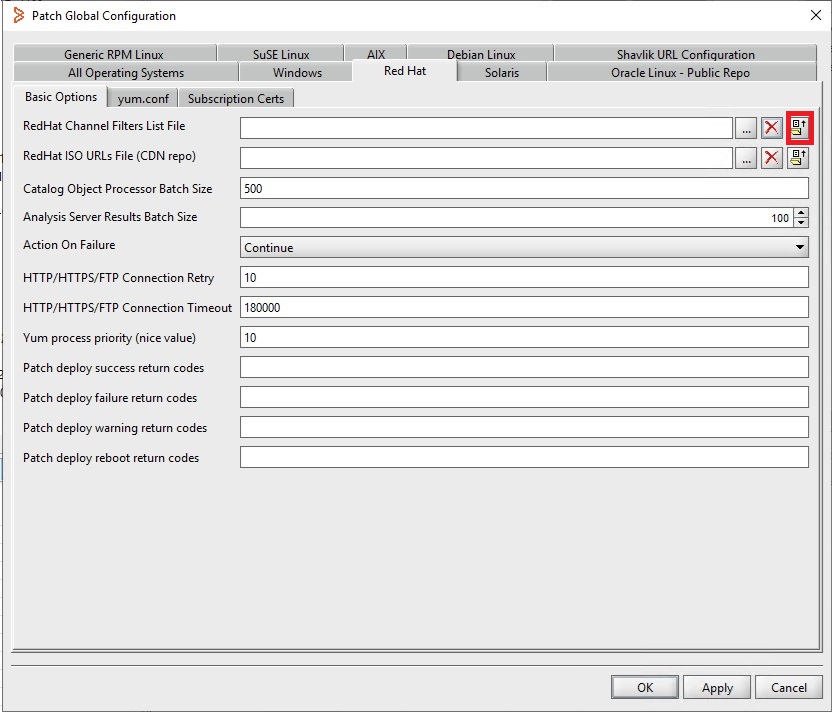
Step 3: Go to 'Red Hat' tab and click on an icon to export the current channel filter list file to the blank file that was created previously
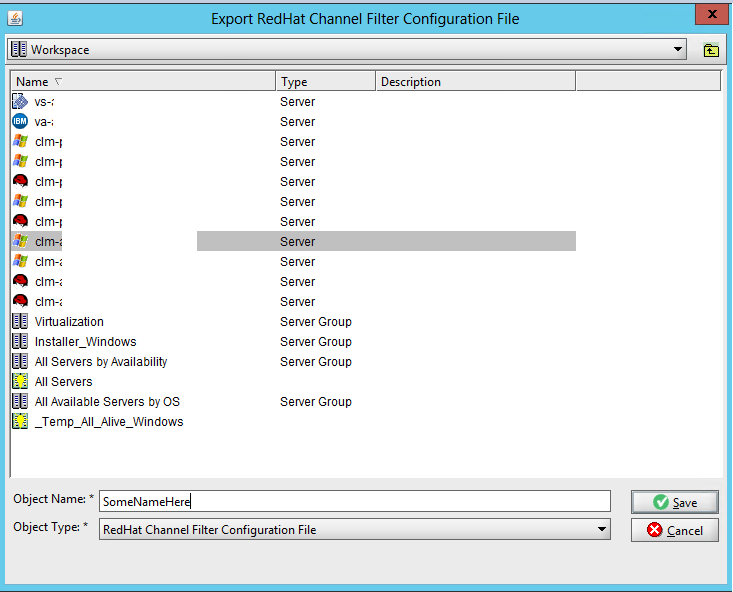
Step 4: Select the server containing the blank xml file and the file to export the channel list.
Step 5: Once it's exported, go to the repository server, register to Red Hat, then check the available channel list, then enable the channel as below example:
# register the repository server to Red Hat
subscription-manager register
# check if the channel is available
subscription-manager repos --list | grep ansible-automation-platform-2.5-for-rhel-9-x86_64-rpms
subscription-manager repos --list | grep codeready-builder-for-rhel-9-x86_64-rpms
# check if the channel is already enabled or not
subscription-manager repos --list-enabled
# enable the channel if the channel is not enabled yet
subscription-manager repos --enable=ansible-automation-platform-2.5-for-rhel-9-x86_64-rpms
subscription-manager repos --enable=codeready-builder-for-rhel-9-x86_64-rpms
# export all available channels to a file for review
subscription-manager repos --list > "/tmp/all-channels.txt"
Step 6: Add the following channels (based on the output file - 'all-channels.txt') to the exported XML file ('RHEL-Updated-Channel-Filter-List.xml') at the bottom and save the file:
<redhat-channel use-reposync="true">
<channel-name>Red Hat Ansible Automation Platform 2.5 for RHEL 9 x86_64 (RPMs)</channel-name>
<channel-label>ansible-automation-platform-2.5-for-rhel-9-x86_64-rpms</channel-label>
<channel-os>RHES9</channel-os>
<channel-arch>x86_64</channel-arch>
<channel-url>https://cdn.redhat.com/content/dist/layered/rhel9/x86_64/ansible-automation-platform/2.5/os</channel-url>
</redhat-channel>
<redhat-channel use-reposync="true">
<channel-name>Red Hat CodeReady Linux Builder for RHEL 9 x86_64 (RPMs)</channel-name>
<channel-label>codeready-builder-for-rhel-9-x86_64-rpms</channel-label>
<channel-os>RHES9</channel-os>
<channel-arch>x86_64</channel-arch>
<channel-url>https://cdn.redhat.com/content/dist/rhel9/9/x86_64/codeready-builder/os</channel-url>
</redhat-channel>
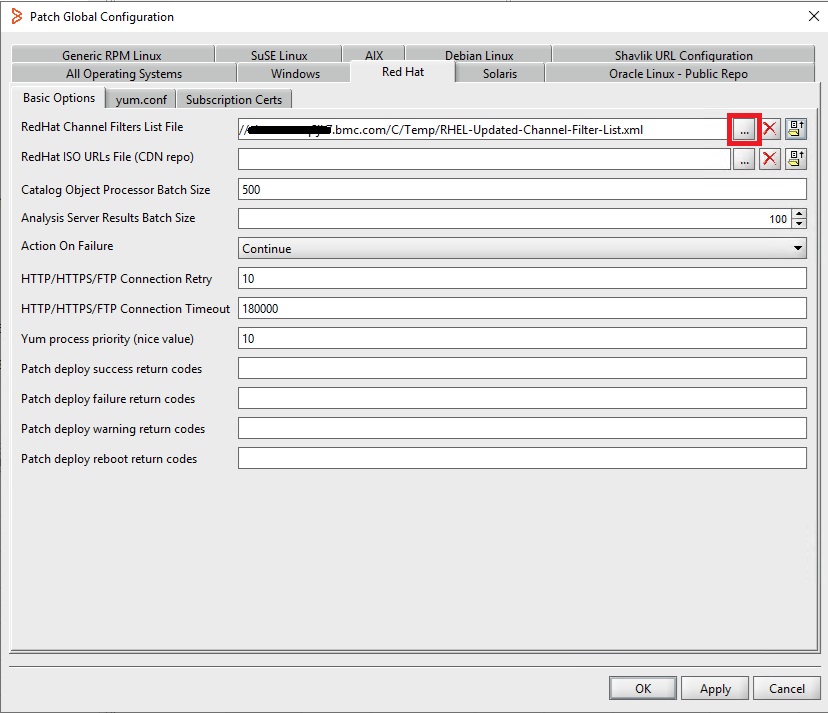
Step 7: Click on eclipse (...) to specify the updated XML file, click on 'Apply' and 'OK' to close
Step 8: Open the RHEL patch catalog, click on 'Edit Filter' to open the filter, then you will find those added channels in the list, add them and click 'OK' to close, then save the change.
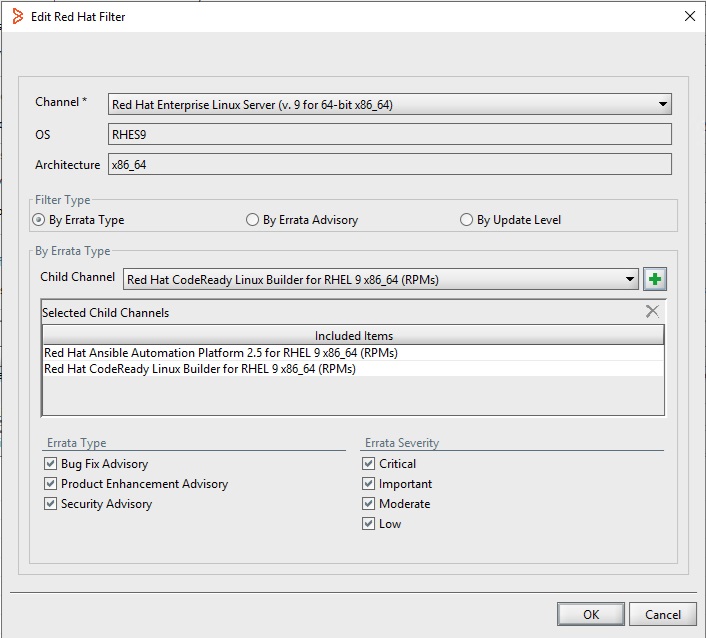
Step 9: Update the catalog
NOTE:
If the catalog update fails and 'yum_metadata_generator.log' shows 404 error, there may be some issues with the entitlement/subscription so you need to consult with the vendor support (Red Hat) to rectify
If the details of the child channel was added correctly, you should see the RPMs now.
Following are the youtube links of the video which talks about addding child channels in BSA :
https://www.youtube.com/watch?v=YAo4BP1zMVI&list=PLr4ck07lc-F8V_2QQZPMzp37caygliqhJ&index=78
https://www.youtube.com/watch?v=iI5iROY-TxY&list=PLr4ck07lc-F8V_2QQZPMzp37caygliqhJ&index=85
https://www.youtube.com/watch?v=24mjkr2NEU4&index=84&list=PLr4ck07lc-F8V_2QQZPMzp37caygliqhJ